Latest Post

I have implemented windows server 2019 clustering by using the below methods,

  • Installed windows 2019 standard evaluation edition on 3 machines.
  • SRVRDC (will act as a domain controller), SRVR1, and SRVR2 (these two will act as nodes)
  • Disabled firewall and UAC on 3 machines.
  • Done IP configuration on all three machines as below.
Network IP configuration is done as shown below
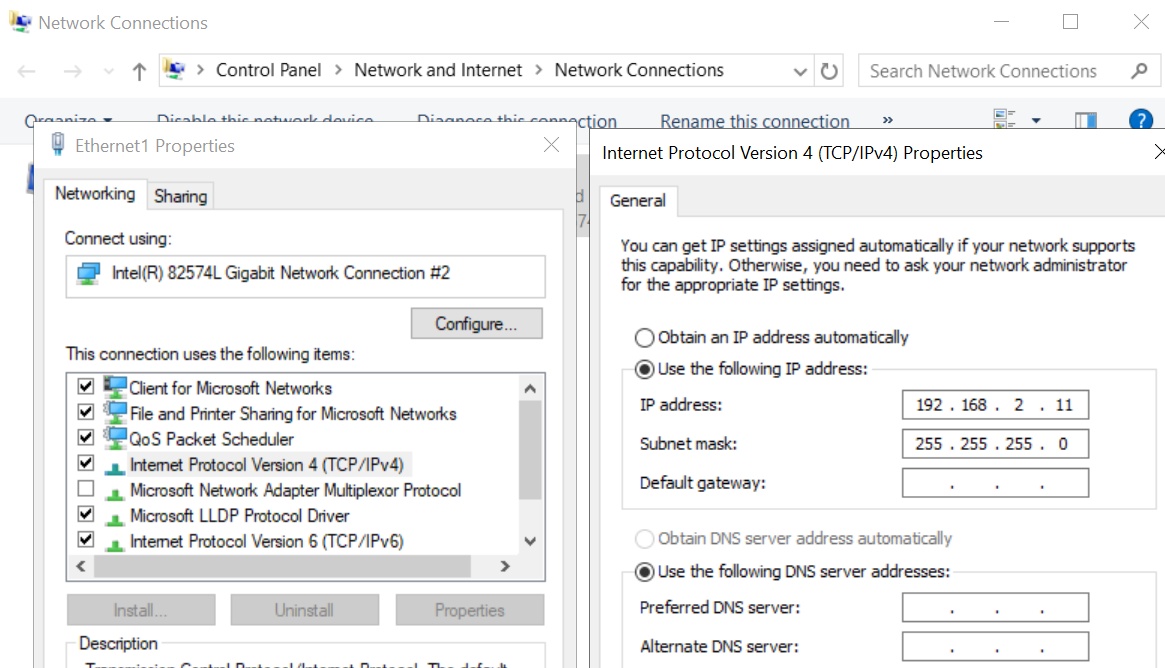


Public IP address is configured as shown blelow 


Private IP configuration is done as shown below


IP configuration for SRVRDC 

192.168.1.110
255.255.255.0
192.168.1.110

IP configuration for SRVR1

192.168.1.111
255.255.255.0
192.168.1.110

- Private network  
192.168.2.11

IP configuration for SRVR2

192.168.1.112
255.255.255.0
192.168.1.110

Private network  
192.168.2.12

  • Need to add .net 3.5 and failover cluster feature on SRVR1 and SRVR2
  • On SRVRDC enable iSCSI initiator from the server manager file share. and create storage.
  • Once storage is created add them from the iSCSI drives. capacity is given as below.

  1. UserDB     R = 8 GB
  2. UserDBLog  S = 6 GB
  3. Tempdb     T = 2 GB
  4. MSDTC   M = 1 GB
  5. Quorum  Q = 1
  • Once storage created initiate them from node1 and node2 respectively 


 we have use below TSQL script to take all database backup jobs 


DECLARE @name VARCHAR(50) -- database name  
DECLARE @path VARCHAR(256) -- path for backup files  
DECLARE @fileName VARCHAR(256) -- filename for backup  
DECLARE @fileDate VARCHAR(20) -- used for file name
DECLARE @DeleteDate DATETIME = Dateadd(hh, -22, Getdate());
-- specify database backup directory
SET @path =
'\\servername\foldername\'
-- specify filename format
SELECT @fileDate = CONVERT(VARCHAR(20), Getdate(), 112) + '_'
                   + Replace(CONVERT(VARCHAR(20), Getdate(), 108), ':', '')
DECLARE db_cursor CURSOR read_only FOR
  SELECT NAME
  FROM   master.dbo.sysdatabases
  WHERE  NAME NOT IN ( 'master', 'model', 'msdb', 'tempdb'
                     ) -- exclude these databases
OPEN db_cursor
FETCH next FROM db_cursor INTO @name
WHILE @@FETCH_STATUS = 0
  BEGIN
      SET @fileName = @path + @name + '_' + @fileDate + '.BAK'
      BACKUP DATABASE @name TO DISK = @fileName WITH copy_only, noformat, noinit
      ,
      skip, norewind, nounload, compression, stats = 2
      FETCH next FROM db_cursor INTO @name
  END
EXEC master.sys.Xp_delete_file
  0,
  @path,
  'BAK',
  @DeleteDate,
  0;
CLOSE db_cursor
DEALLOCATE db_cursor 


 we can use below script to get last database name and date by executing below script

SELECT bus.database_name Org_DBName,
       restored_to_dbname,
       last_date_restored
FROM   msdb..backupset bus
       INNER JOIN (SELECT backup_set_id,
                          restored_to_dbname,
                          last_date_restored
                   FROM   msdb..restorehistory
                          INNER JOIN (SELECT rh.destination_database_name
                                             Restored_To_DBName,
                                             Max(rh.restore_date)
                                             Last_Date_Restored
                                      FROM   msdb..restorehistory rh
                                      GROUP  BY rh.destination_database_name) AS
                                     InnerRest
                                  ON destination_database_name =
                                     restored_to_dbname
                                     AND restore_date = last_date_restored) AS
                  RestData
               ON bus.backup_set_id = RestData.backup_set_id 


 we can use the below script to check database backup restore percentage details and many more.


use master;

SELECT r.session_id,r.command,CONVERT(NUMERIC(6,2),r.percent_complete) 
AS [Percent Complete],CONVERT(VARCHAR(20),DATEADD(ms,r.estimated_completion_time,GetDate()),20) AS [ETA Completion Time], 
CONVERT(NUMERIC(10,2),r.total_elapsed_time/1000.0/60.0) AS [Elapsed Min], 
CONVERT(NUMERIC(10,2),r.estimated_completion_time/1000.0/60.0) AS [ETA Min], 
CONVERT(NUMERIC(10,2),r.estimated_completion_time/1000.0/60.0/60.0) AS [ETA Hours], 
CONVERT(VARCHAR(1000),(SELECT SUBSTRING(text,r.statement_start_offset/2, 
CASE WHEN r.statement_end_offset = -1 THEN 1000 ELSE (r.statement_end_offset-r.statement_start_offset)/2 END) 
FROM sys.dm_exec_sql_text(sql_handle))) 
FROM sys.dm_exec_requests r WHERE command IN ('RESTORE DATABASE','RESTORE LOG','BACKUP DATABASE', 'BACKUP LOG','DbccSpaceReclaim','DbccFilesCompact')

It is very important to take a database users and the respective privileges backup while you perform a database restore, as once the database restore complete we must replace the same access rights before so that application activities never disturb. 

to achieve this requirement we can use below script to take the specific database users and the roles. 

[code type="SQL"] Use <'database name here'> go SELECT 'IF NOT EXISTS (SELECT 1 FROM sys.database_principals WHERE name = ' + QuoteName(dp.name, char(39)) + ') CREATE USER ' + QuoteName(dp.name) + IsNull(' FOR LOGIN ' + QuoteName(sp.name),'') + IsNull(' WITH DEFAULT_SCHEMA = ' + QuoteName(dp.default_schema_name),'') + ';' COLLATE DATABASE_DEFAULT FROM sys.database_principals dp LEFT JOIN sys.server_principals sp ON sp.sid = dp.sid WHERE dp.type in ('G','U','S') go SELECT 'exec sp_addrolemember ' + '''' + (r3.name) + '''' + ',' + '''' + (r2.name) + '''' + ';' FROM sys.database_role_members r1 inner join sys.database_principals r2 on r1.member_principal_id = r2.principal_id inner join sys.database_principals r3 on r1.role_principal_id = r3.principal_id GO [/code]


Test code given below:

Use <'database name here'>
go
SELECT 'IF NOT EXISTS (SELECT 1 FROM sys.database_principals WHERE name = ' + 
QuoteName(dp.name, char(39)) + 
') CREATE USER ' + QuoteName(dp.name) + 
IsNull(' FOR LOGIN ' + QuoteName(sp.name),'') + 
IsNull(' WITH DEFAULT_SCHEMA = ' + QuoteName(dp.default_schema_name),'') + ';' COLLATE DATABASE_DEFAULT 
FROM sys.database_principals dp 
LEFT JOIN sys.server_principals sp 
ON sp.sid = dp.sid 
WHERE dp.type in ('G','U','S') 
go
SELECT 'exec sp_addrolemember ' + '''' + (r3.name) + '''' + ',' + '''' + (r2.name) + '''' + ';' 
FROM sys.database_role_members r1 
inner join sys.database_principals r2 
on r1.member_principal_id = r2.principal_id 
inner join sys.database_principals r3 
on r1.role_principal_id = r3.principal_id 
GO


Below script can be used to get information about the SQL databases,

select backup_start_date, backup_finish_date, database_name,type,name,user_name,description
from msdb.dbo.backupset
where type='D' ----- I for diff, D for full and L for log
and database_name='master'
order by backup_start_date desc


we will need to use D, I and L for the backup type and should also be change for the required database name.

Below is the super script to use


create table #dbfiles (

[Database] sysname, 

Name sysname, 

[Type] sysname, 

[Filename] nvarchar(1024), 

Allocated int, 

Used int, 

Available int

) exec sp_msforeachdb 'use [?];insert into #dbfiles

select

''?'' as [Database]

, a.Name

, dbf.type_desc as [Type]

, a.Filename

, convert(int,round(a.Size/128.000,0)) as Allocated

, convert(int,round(fileproperty(a.Name,''SpaceUsed'')/128.000,0)) as Used

, convert(int,round((a.Size-fileproperty(a.Name,''SpaceUsed''))/128.000,0)) as Available

from

dbo.sysfiles a (nolock)

inner join sys.database_files dbf (nolock)

on a.fileid = dbf.file_id

where

db_id(''?'') not in (1,2,3,4)';

select 

  *, 

  'use [' + [Database] + ']; dbcc shrinkfile (''' + [Name] + ''', ' + cast(

    (Used + 1) as nvarchar(16)

  ) + ');' 

from 

  #dbfiles where [type]='LOG'

order by 

  Available desc 

drop 

  table #dbfiles


 Below script is useful when you work with missing index in SQL server database, run below script on database it gives complete info where we have any missing indexes on the database, you need to change database name and values got get full data/fino,


select

*

, 'create index IX_'

+ replace(object_name(object_id, database_id), ' ', '_')

+ '_' + convert(varchar, mig.index_group_handle) + '_' + convert(varchar, mid.index_handle)

+ ' on ' + statement

+ ' (' + isnull (equality_columns,'') 

+ case when equality_columns is not null and inequality_columns is not null

then ','

else ''

end 

+ isnull (inequality_columns, '')

+ ')'

+ isnull(' include (' + included_columns + ')', '')

as create_index_statement

from

(

select

user_seeks * avg_total_user_cost * (avg_user_impact * 0.01) as index_advantage

, migs.*

from

sys.dm_db_missing_index_group_stats migs

) as migs_adv

inner join sys.dm_db_missing_index_groups as mig

on migs_adv.group_handle = mig.index_group_handle

inner join sys.dm_db_missing_index_details as mid

on mig.index_handle = mid.index_handle

where

 database_id = DB_ID('msdb')

 and

index_advantage > 10000

order by

migs_adv.index_advantage desc


=======


  • Use below TSQL script to get a complete history of single database backup history, you will need to change the backup type from D to I  and L to check Differential and Log backup history respectively. 


select @@servername [Server Name],backup_start_date, backup_finish_date, database_name,type,name,user_name,description
,(backup_size /1024.00 /1024.00 /1024.00) as backup_size_GB
,(compressed_backup_size /1024.00 /1024.00 /1024.00) as Compressed_backup_size_GB
from msdb.dbo.backupset 
where type='D' ----- I for diff, D for full and L for log
and database_name='msdb'  
order by backup_start_date desc 


  • Below script can be used when want to see whole 7 days database backup history of whole week for all the databases of SQL instance.
SELECT 
CONVERT(CHAR(100), SERVERPROPERTY('Servername')) AS Server, 
msdb.dbo.backupset.database_name, 
msdb.dbo.backupset.backup_start_date, 
msdb.dbo.backupset.backup_finish_date, 
msdb.dbo.backupset.expiration_date, 
CASE msdb..backupset.type 
WHEN 'D' THEN 'Database' 
WHEN 'L' THEN 'Log' 
END AS backup_type, 
msdb.dbo.backupset.backup_size, 
msdb.dbo.backupmediafamily.logical_device_name, 
msdb.dbo.backupmediafamily.physical_device_name, 
msdb.dbo.backupset.name AS backupset_name, 
msdb.dbo.backupset.description 
FROM msdb.dbo.backupmediafamily 
INNER JOIN msdb.dbo.backupset ON msdb.dbo.backupmediafamily.media_set_id = msdb.dbo.backupset.media_set_id 
WHERE (CONVERT(datetime, msdb.dbo.backupset.backup_start_date, 102) >= GETDATE() - 7) 
ORDER BY 
msdb.dbo.backupset.database_name, 
msdb.dbo.backupset.backup_finish_date 

  • Below Script can be used to get database backup history of one database for 40 days,
select backup_start_date, backup_finish_date, database_name,type,name,user_name,description
,(backup_size /1024.00 /1024.00 /1024.00) as backup_size_GB
,(compressed_backup_size /1024.00 /1024.00 /1024.00) as Compressed_backup_size_GB
from msdb.dbo.backupset 
where database_name='msdb'  
and (CONVERT(datetime, msdb.dbo.backupset.backup_start_date, 102) >= GETDATE() - 40) 
order by backup_start_date desc


Author Name

Contact Form

Name

Email *

Message *

Powered by Blogger.